Numerical-Relativity Data
bayRing fits one complex NR multipole at a time. The [NR-data] section
selects the catalogue, simulation, resolution, waveform type, fitted
multipole, local paths and NR error prescription.
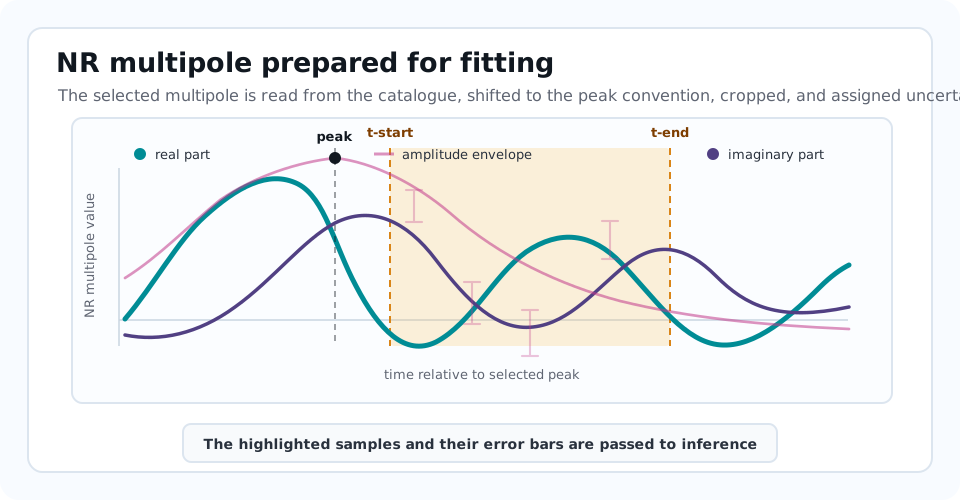
The catalogue reader keeps the full multipole available for context, while inference uses only the highlighted interval and the corresponding error vector.
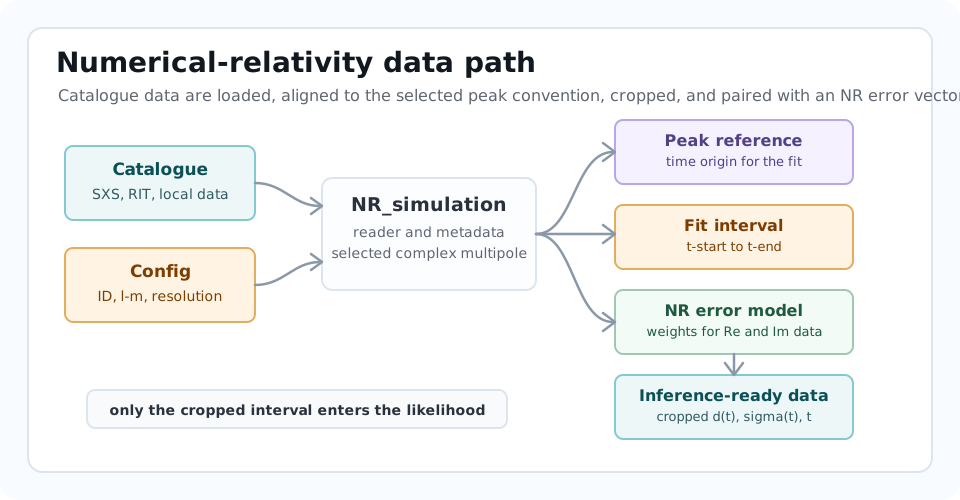
Catalogue Selection
The primary option is:
[NR-data]
catalog = SXS
ID = 0305
Supported catalogue names in the current parser are:
|
Typical data source |
Notes |
|---|---|---|
|
Simulating eXtreme Spacetimes catalog |
Default catalogue. |
|
RIT numerical-relativity catalogue |
Uses local RIT waveform/metadata paths, with download attempts for some missing RIT files. |
|
Local Teukolsky perturbation data |
Not public NR data. Supports named resolution levels or explicit
|
|
Regge-Wheeler-Zerilli environmental simulations |
Not public NR data. Developer-level path format. The tracked example
uses |
|
Local C2EFT data |
Not public NR data. Some resolution/extrapolation choices are currently hard-coded in the reader. |
|
Charged black-hole database |
Not public NR data. Uses the |
|
Local raw charged-waveform files |
Reads raw |
|
Internal Kerr-QNM synthetic data |
Builds a fake NR waveform from metadata and requested injection modes. |
The default catalogue is SXS and the default simulation ID is 0305.
Local Data Paths
dir points to catalogue data when the selected backend needs local files:
[NR-data]
dir = /path/to/local/catalog/data
If an option needs data outside the installed package and the path is not
explicitly supplied, bayRing can fall back to BAYRING_PREFIX for
repository-relative data layouts. Set:
export BAYRING_PREFIX=/path/to/bayRing
Optional metadata tables use:
[NR-data]
properties-file = /path/to/properties.csv
fits-file = /path/to/fits.csv
properties-file supplies extra NR quantities such as peak amplitudes or
noncircular variables. fits-file supplies fit coefficients for calibrated
templates such as some TEOBPM workflows. Empty strings are treated as no
file supplied.
Multipole Selection
The fitted NR multipole is set with:
[NR-data]
l-NR = 2
m = 2
The selected (l-NR, m) is the spherical-harmonic multipole read from the NR
data. It does not force every model QNM to have the same l. In the Kerr
template, multiple spheroidal QNMs with the same azimuthal index can contribute
to the selected spherical multipole.
For informed-amplitude fits using the (2,2) peak time as reference, provide
the time of the (2,2) peak:
[NR-data]
l-NR = 3
m = 3
t-peak-22 = 3800.6154428984305
Time Axis And Fit Window
After the waveform is loaded, bayRing computes the amplitude and phase of
the complex NR multipole. It then finds a peak time:
for non-eccentric or very high-eccentricity waveforms, the peak is the maximum amplitude sample;
for eccentric waveforms with
1e-3 < ecc < 0.89, the code tries to use the last relative amplitude maximum;for Teukolsky linear perturbations,
dt-scdcan shift the peak to a secondary reference time;a nonzero
t-peak-22overrides those choices.
The fit interval is:
These values are set in the [Inference] section:
[Inference]
t-start = 20.0
t-end = 140.0
The code crops the NR waveform, error vector and time array to this interval before inference.
Waveform Type
waveform-type selects which waveform quantity is read where the backend
supports multiple choices:
[NR-data]
waveform-type = strain
The default is strain. Some catalogue paths can also handle psi4.
Make sure the selected model and post-processing interpretation match the
quantity being fitted.
Resolution And Extrapolation
The main resolution options are:
Option |
Meaning |
|---|---|
|
Catalogue resolution level. For SXS, |
|
SXS extrapolation order. The default is |
|
Teukolsky radial and angular collocation counts. When both are nonzero,
they override |
|
Teukolsky perturbation order, usually |
For Teukolsky data, integer res-level values map to specific
nx/nl pairs in convert_resolution_level_Teukolsky. Explicit
res-nx and res-nl are useful when the desired resolution is not one of
the named levels.
NR Error Prescriptions
The likelihood compares real and imaginary residuals against the complex error vector. The real part of the error weights the real residual; the imaginary part weights the imaginary residual.
The simplest error is a constant:
[NR-data]
error = constant-0.0001
This generates a complex error with real and imaginary components both equal
to 0.0001 at every time sample.
Catalogue-dependent options include:
Option |
Behaviour |
|---|---|
|
Use the constant error value |
|
Use the catalogue metadata value |
|
For SXS-like resolution comparisons, align the lower-resolution waveform by minimizing mismatch and use the resolution difference. |
|
For SXS-like data, include both resolution and extrapolation differences after mismatch alignment. |
|
Align comparison waveforms at the amplitude peak rather than through a mismatch minimization. |
|
For Teukolsky data, compare against another resolution level when available. |
|
For |
|
For |
Mismatch-alignment options use:
[NR-data]
error-t-min = 0.3
error-t-max = 0.004
The implementation converts these fractional inputs using the peak time: